

Install the plugin
Install the Adobe plugin under Settings → Plugin Sources, then quit Premiere Pro and start it again. The same plugin serves After Effects.Switch on Mercury Transmit
1
Open the playback preferences
In Premiere, go to Premiere Pro → Preferences → Playback. Recent versions call that menu Settings.
2
Enable Mercury Transmit
Tick Enable Mercury Transmit. Without it the whole device list stays inactive, no matter what else you set.
3
Select dfine.io Transmit
In the device list, tick the checkbox for dfine.io Transmit under Video Stream. Tick Audio Stream as well if you want sound on the stream.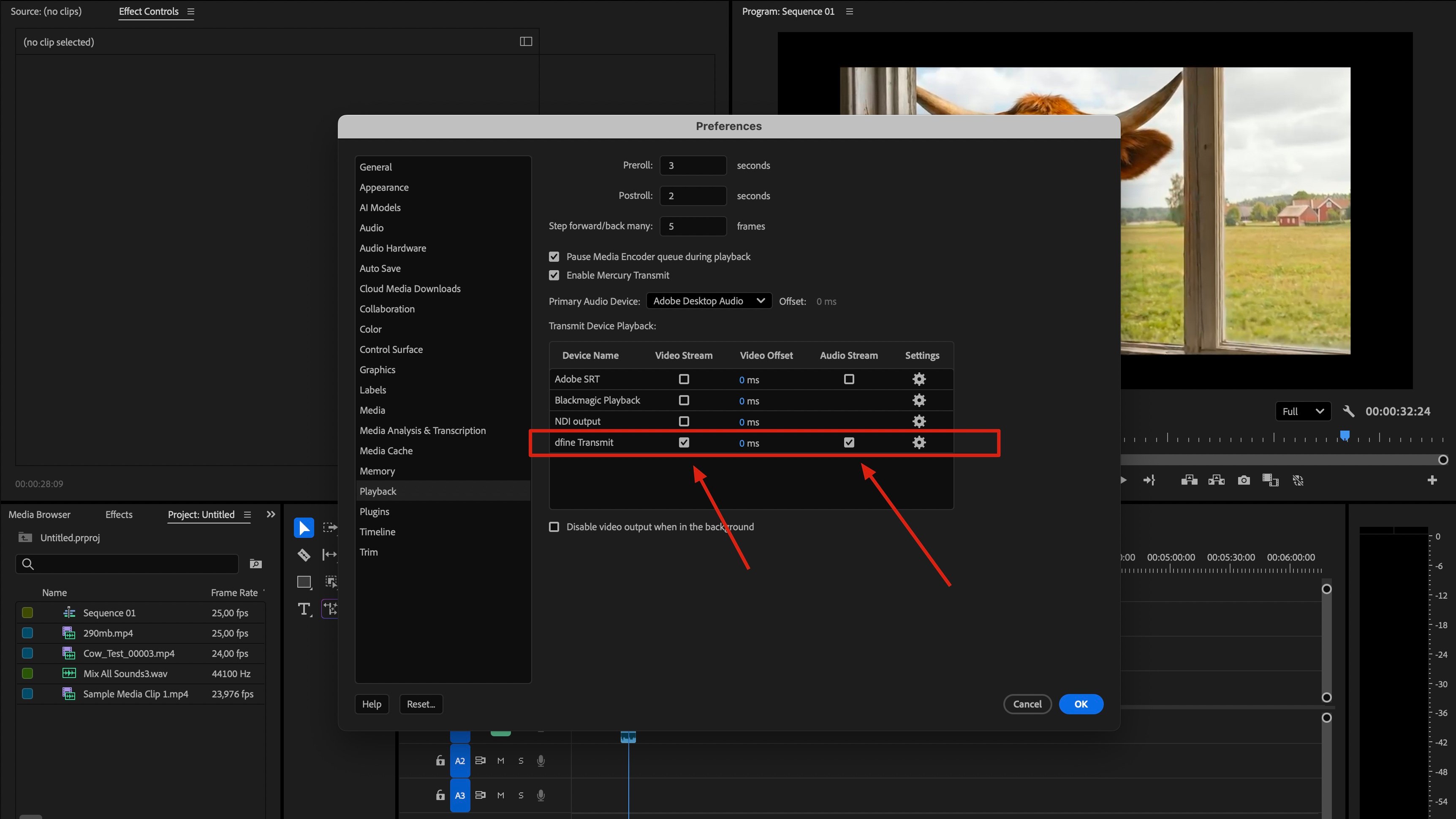
4
Confirm with OK
Close the preferences. Premiere starts feeding the device right away.
Check that it arrives
Play your sequence in Premiere, then follow Check that it arrives on the Ingest tab.Premiere only sends while it is playing or scrubbing. On a paused timeline the last frame stays on the stream, which is normal and not an error.