> ## Documentation Index
> Fetch the complete documentation index at: https://docs.dfine.app/llms.txt
> Use this file to discover all available pages before exploring further.
# Stream an SDI or HDMI feed
> Stream the SDI or HDMI output of your suite live into a Review room or to Streaming Classic with dfine.io Studio and a Blackmagic capture card.
Loop the SDI or HDMI output of your edit suite, grading system or camera into a Blackmagic capture card. The **SDI/HDMI IN** row of dfine.io Studio sends that feed to Review or Streaming Classic. No hardware encoder is needed.
**You need** [dfine.io Studio](/en/apps/studio/index), a Blackmagic DeckLink or UltraStudio card with the **Desktop Video** driver, and a Review room or a Streaming Classic stream.
The driver for DeckLink and UltraStudio cards.
## 1. Set up the input
Cable the SDI or HDMI output of your source into the input of the card.
In Studio's **Sources** panel, click the gear on **SDI/HDMI IN**. Without the driver the row reads **Not available on this Mac**.
Pick the **Device** and set **Mode** to the format of the incoming signal. **Pixel Format**, **Color Space** and **Color Range** match the signal as well. Until a card is chosen, the row reads **No card chosen yet**.
## 2. Pick where it goes
In Review, open the room and create a source with the type **WHIP**, or use **Quick Create**. Click **Copy Stream Key**.
In Studio's **Stream** panel, set **Destination** to **dfine.io Review**. **Server** reads **dfine.io Review · WHIP, fixed**. Paste the key into **Stream Key**.
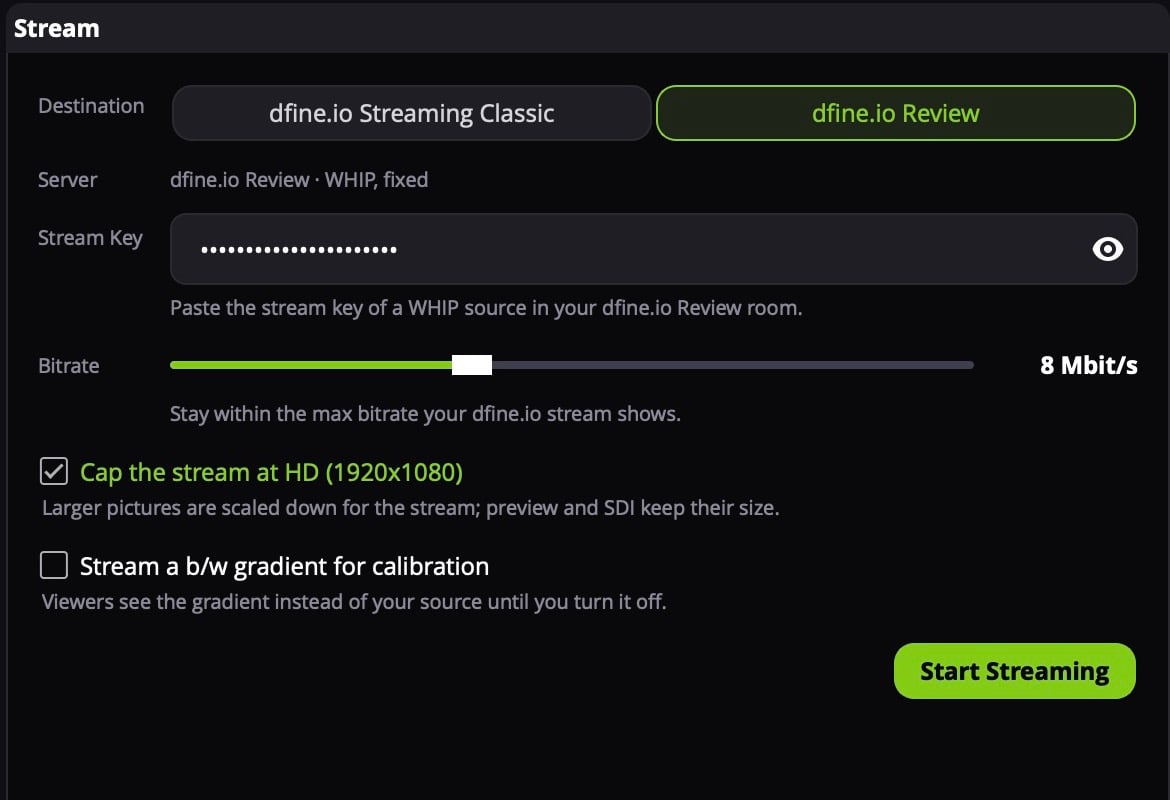 Paste the key of a **WHIP** source. Review refuses the key of an RTMPS source, those are meant for hardware encoders. Where the key is: [stream key and server URL of a room](/en/review/find/stream-key).
In Streaming Classic, open the stream slot and copy the **RTMPS** server URL and the stream key.
In Studio's **Stream** panel, set **Destination** to **dfine.io Streaming Classic**. Paste the URL into **Server URL** and the key into **Stream Key**.
Paste the key of a **WHIP** source. Review refuses the key of an RTMPS source, those are meant for hardware encoders. Where the key is: [stream key and server URL of a room](/en/review/find/stream-key).
In Streaming Classic, open the stream slot and copy the **RTMPS** server URL and the stream key.
In Studio's **Stream** panel, set **Destination** to **dfine.io Streaming Classic**. Paste the URL into **Server URL** and the key into **Stream Key**.
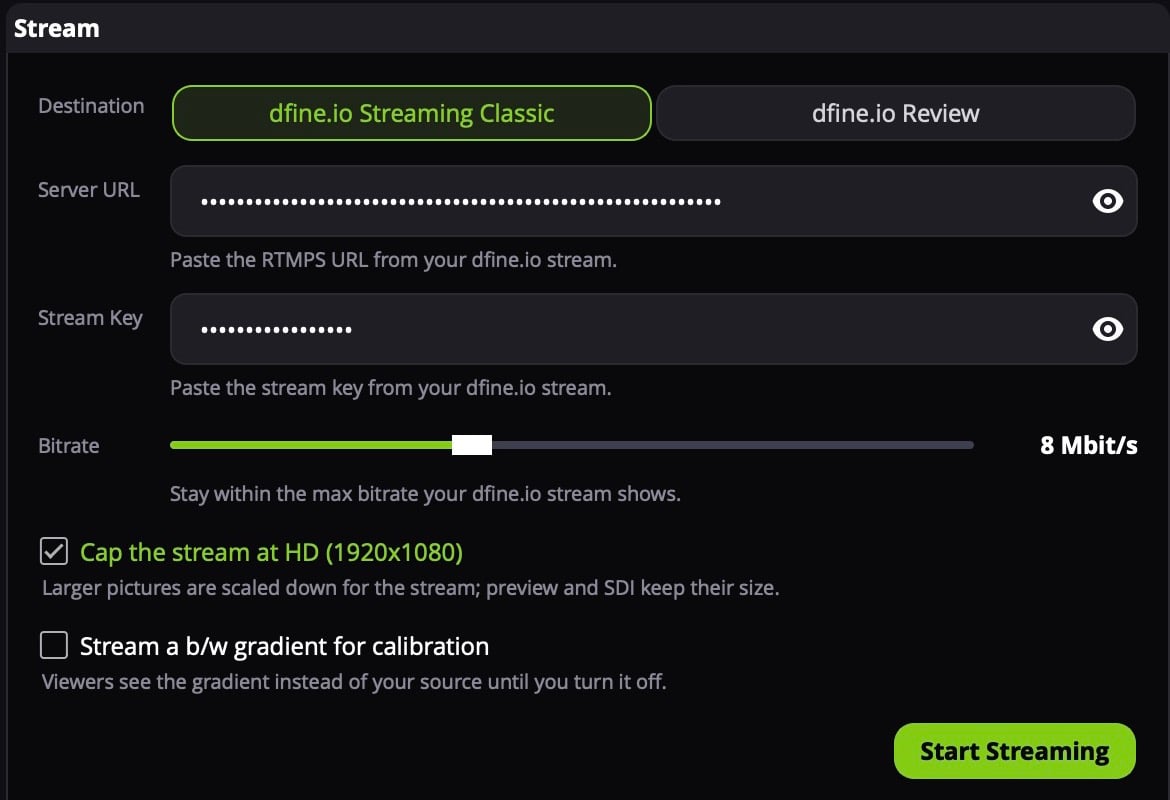 Only `rtmps://` URLs work. Where both values are: [ingest URL and stream key of a slot](/en/streaming-classic/find/ingest-and-stream-key).
## 3. Start
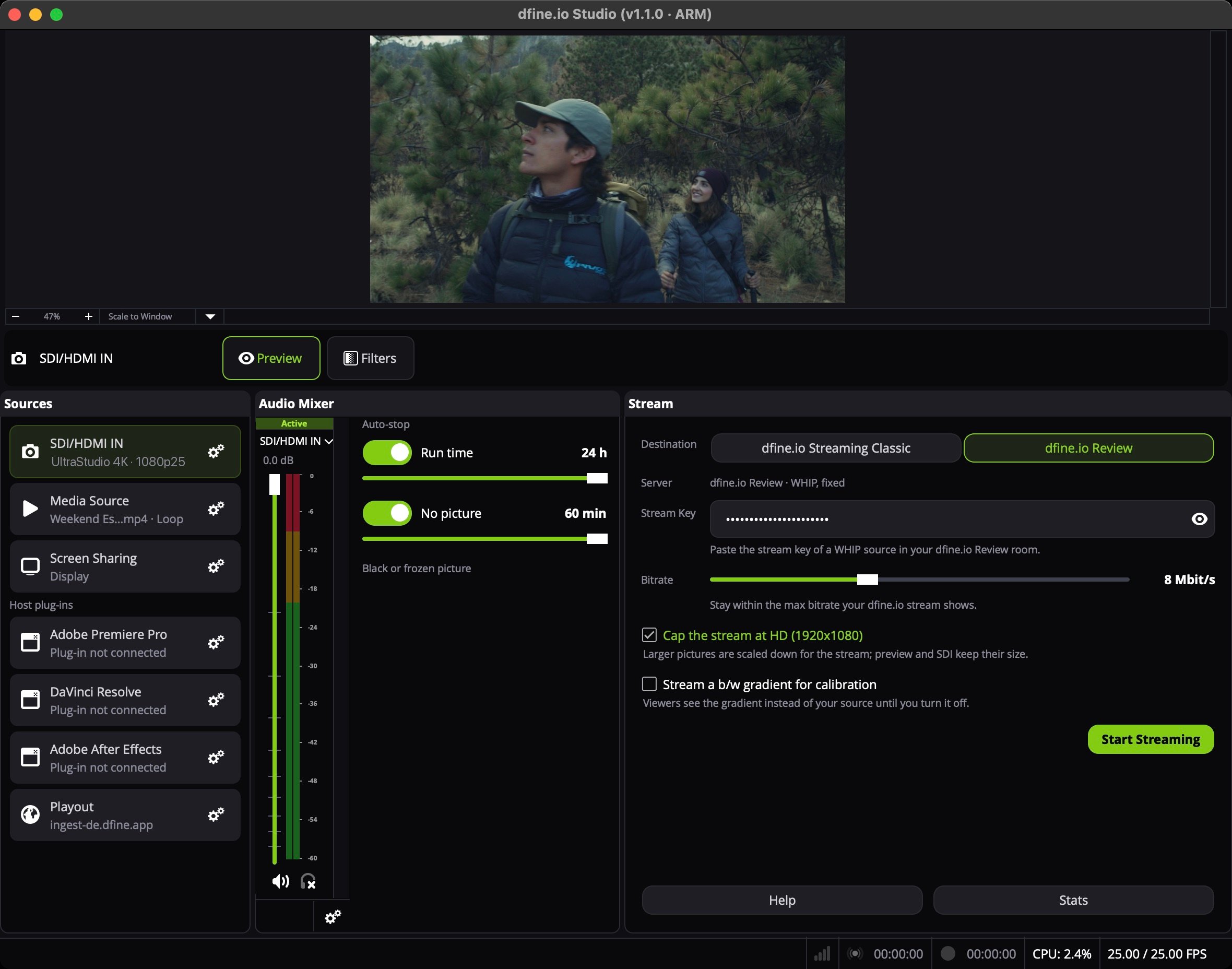
Click the **SDI/HDMI IN** row to put it on air, then click **Start Streaming**. The row shows the card and the mode, for example `UltraStudio 4K · 1080p25`. The stream takes the size of the signal. To send a UHD feed as HD, tick **Cap the stream at HD (1920x1080)**, see [Stream settings](/en/apps/studio/stream-settings).
Only `rtmps://` URLs work. Where both values are: [ingest URL and stream key of a slot](/en/streaming-classic/find/ingest-and-stream-key).
## 3. Start
Click the **SDI/HDMI IN** row to put it on air, then click **Start Streaming**. The row shows the card and the mode, for example `UltraStudio 4K · 1080p25`. The stream takes the size of the signal. To send a UHD feed as HD, tick **Cap the stream at HD (1920x1080)**, see [Stream settings](/en/apps/studio/stream-settings).
 ## When nothing arrives
**The row reads Not available on this Mac.** Install Blackmagic Desktop Video, connect the card and restart Studio.
More causes: [Streaming from dfine.io Studio](/en/troubleshooting/studio).
This documentation is built and hosted on [Mintlify](https://mintlify.com), a developer documentation platform.
## When nothing arrives
**The row reads Not available on this Mac.** Install Blackmagic Desktop Video, connect the card and restart Studio.
More causes: [Streaming from dfine.io Studio](/en/troubleshooting/studio).
This documentation is built and hosted on [Mintlify](https://mintlify.com), a developer documentation platform.