> ## Documentation Index
> Fetch the complete documentation index at: https://docs.dfine.app/llms.txt
> Use this file to discover all available pages before exploring further.
# Where do I find the ingest server URL?
> The RTMPS ingest server URL tells your encoder where to send the signal. Copy it once from Settings.
The ingest server URL tells your encoder where to send the signal. You copy it once from the app and paste it into the server field of your encoder.
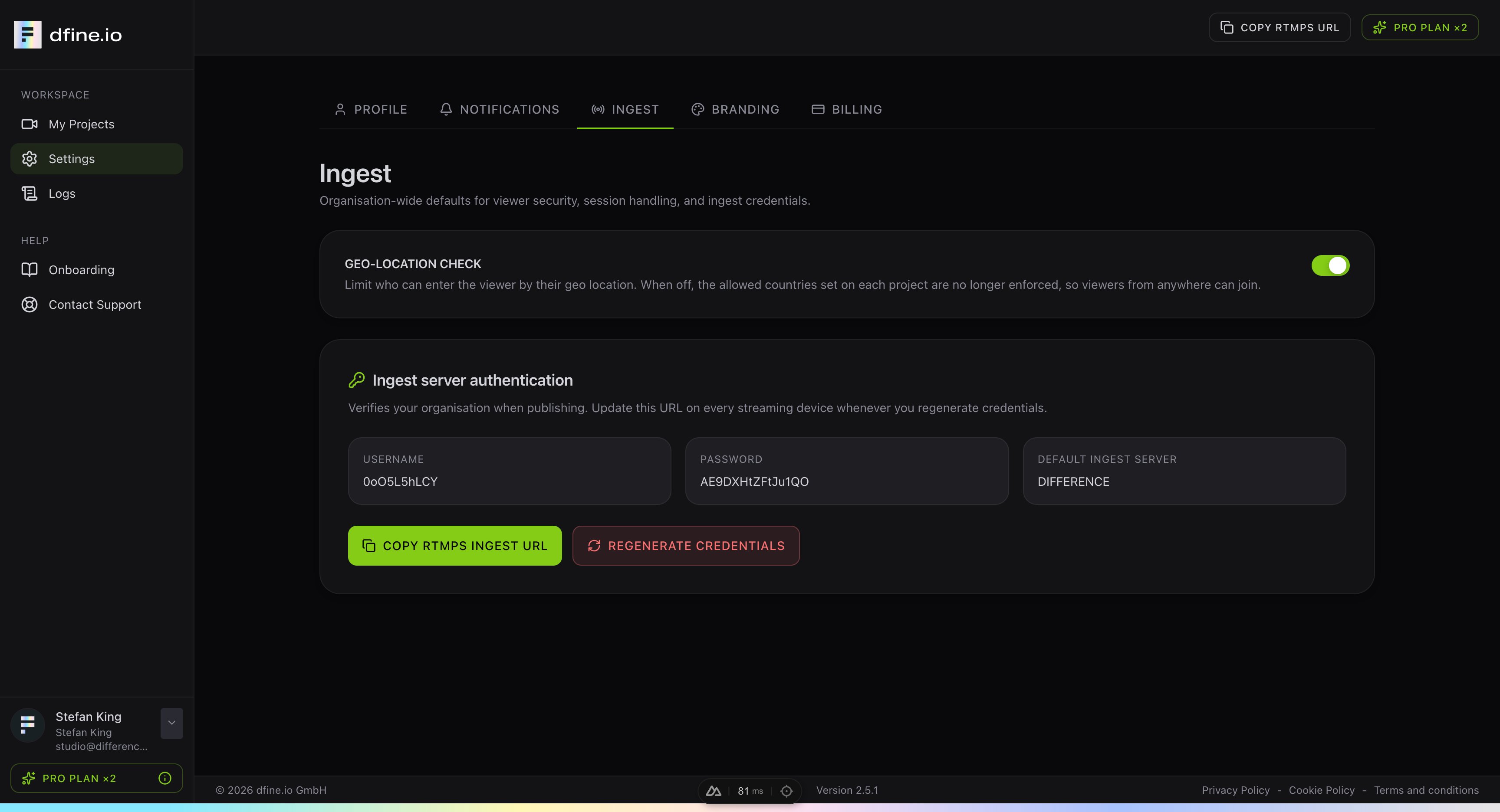
In the app, go to **Settings** and open the **Ingest** tab.
Under **Ingest server authentication** you find your username, password and default ingest server. Click **Copy RTMPS ingest URL** to copy the full address to your clipboard.
 Paste the URL into the **Server** field of your encoder, for example in OBS. The address always starts with `rtmps://` because every stream is encrypted.
If you ever regenerate your credentials, copy the URL again and update it on every device that streams.
A short checklist to get the best possible playback when streaming.
Paste the URL into the **Server** field of your encoder, for example in OBS. The address always starts with `rtmps://` because every stream is encrypted.
If you ever regenerate your credentials, copy the URL again and update it on every device that streams.
A short checklist to get the best possible playback when streaming.