> ## Documentation Index
> Fetch the complete documentation index at: https://docs.dfine.app/llms.txt
> Use this file to discover all available pages before exploring further.
# Frame-accurate review
> Leave feedback on the exact frame and track approval.
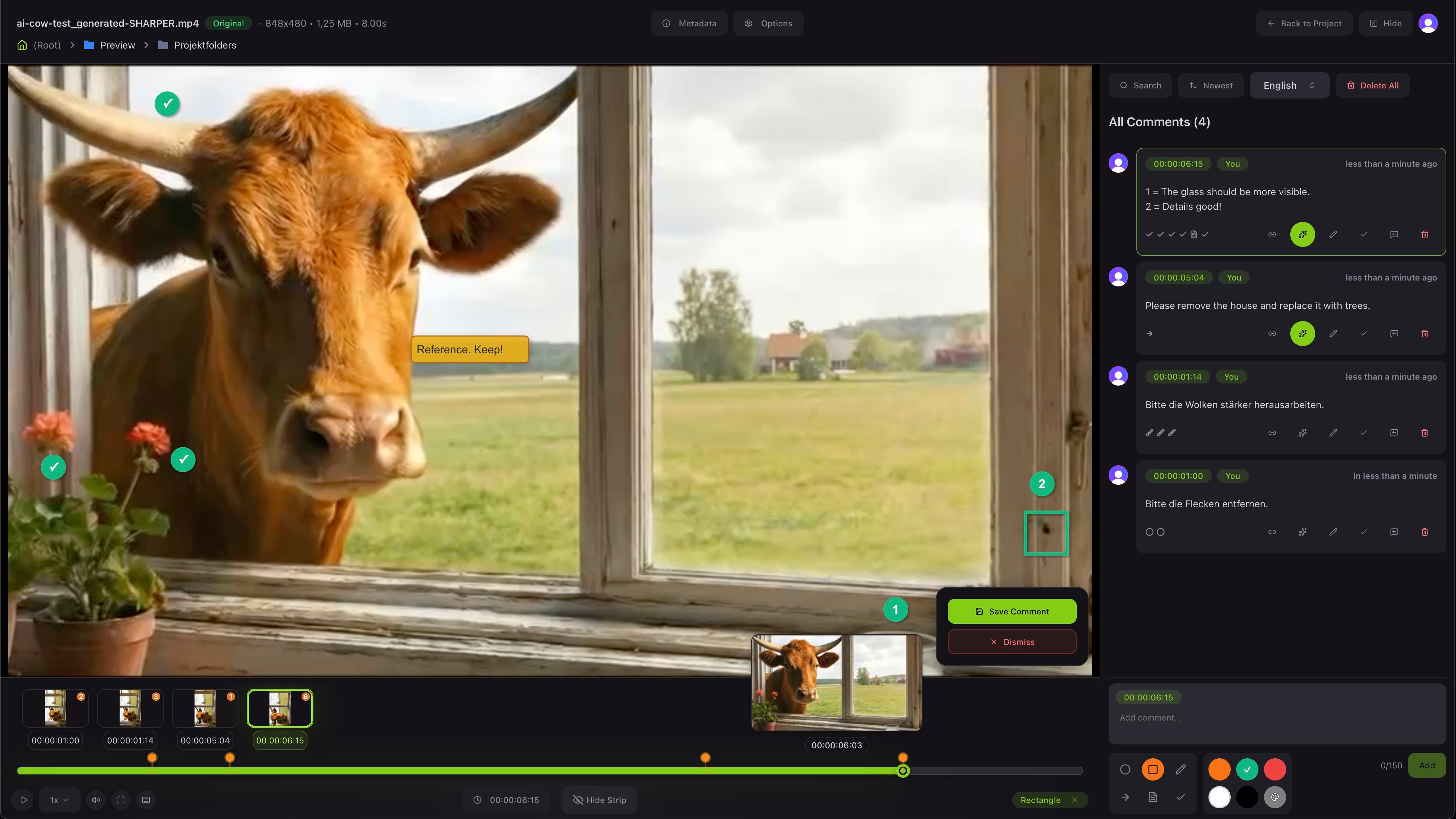
The review viewer is the heart of dfine.io - Review. You see the file on the left and all the feedback on the right. Every comment is tied to an exact frame, so there is never any doubt about which moment you mean.
 ## Leave feedback
Type a comment and it attaches to the current frame. You can draw on the picture with simple tools and pick a color to make your note clear. Team members and clients can reply to each comment, so a whole discussion stays in one place.
## Move through the comments
The strip along the bottom shows a thumbnail for every comment. Click one and the viewer jumps straight to that frame with the drawing shown on top. You can also play, pause and change the speed like any video player.
## Versions and approval
Each file can have several versions. You upload a new version when the work changes, and you can compare it with the one before. When everyone is happy, you mark the file as approved, so the status is clear to the whole team.
Send a link so your client can leave feedback too.
## Leave feedback
Type a comment and it attaches to the current frame. You can draw on the picture with simple tools and pick a color to make your note clear. Team members and clients can reply to each comment, so a whole discussion stays in one place.
## Move through the comments
The strip along the bottom shows a thumbnail for every comment. Click one and the viewer jumps straight to that frame with the drawing shown on top. You can also play, pause and change the speed like any video player.
## Versions and approval
Each file can have several versions. You upload a new version when the work changes, and you can compare it with the one before. When everyone is happy, you mark the file as approved, so the status is clear to the whole team.
Send a link so your client can leave feedback too.