> ## Documentation Index
> Fetch the complete documentation index at: https://docs.dfine.app/llms.txt
> Use this file to discover all available pages before exploring further.
# Kiloview E1 SDI
> Set up a Kiloview E1 SDI hardware encoder to stream to dfine.io over RTMPS.
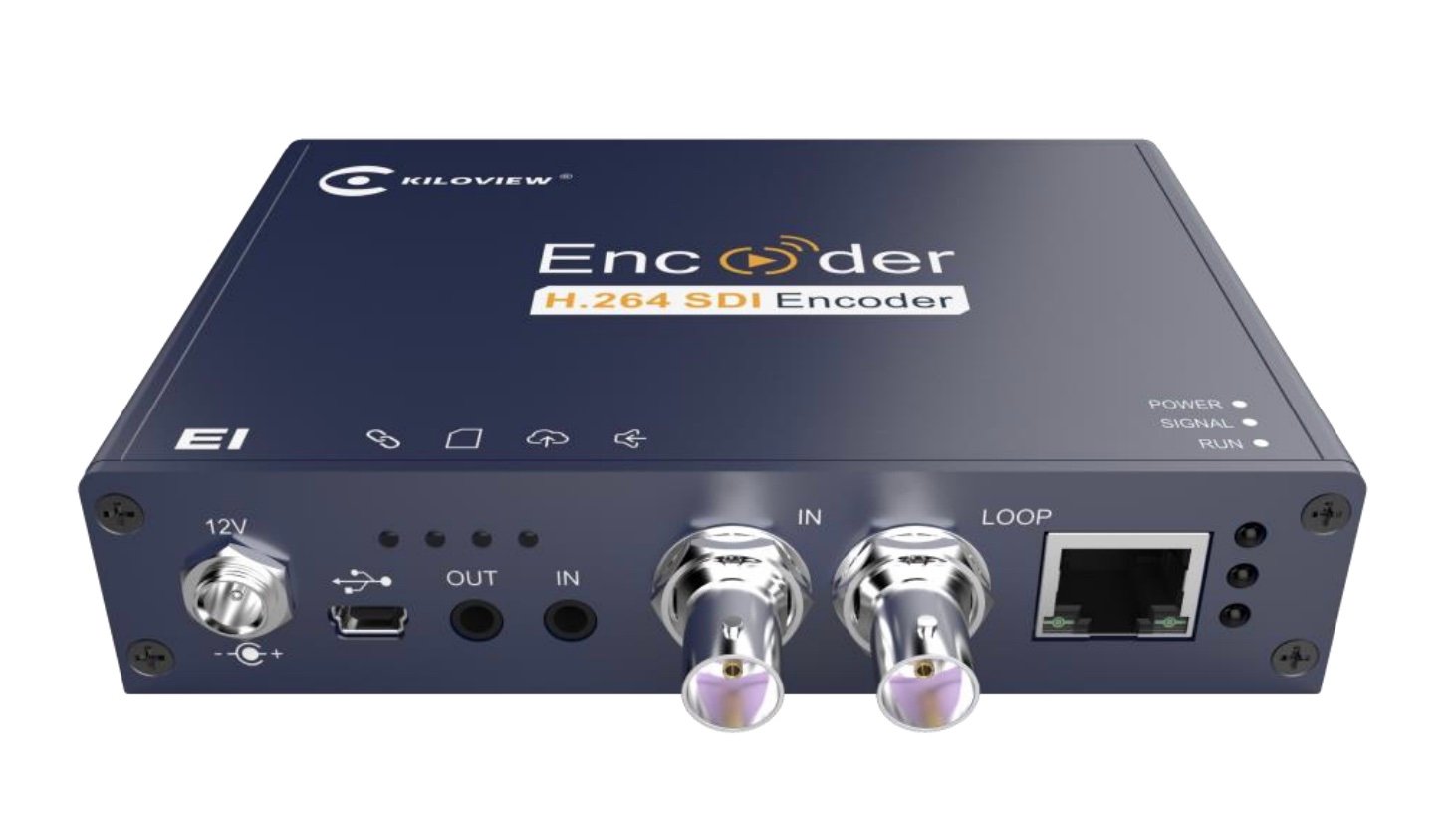
The Kiloview E1 is a small SDI to IP hardware encoder that streams straight to dfine.io, with no computer in between. Connect it once, set the encoder parameters, and push to your ingest over RTMPS.
 These steps apply to **both** dfine.io products that livestream — Streaming Classic and Review. The encoder setup is the same; only where you copy your ingest URL and stream key differs by product. See [Where do I find the ingest server URL?](/en/where-do-i-find-the-ingest-server-url).
## Connect the encoder
Plug your SDI source into the **SDI input**, connect the encoder to your network over Ethernet, and power it on.
Out of the box the encoder gets its address from your network over **DHCP**, and it also keeps a permanent failsafe address, **192.168.1.168**, that is always reachable. For the first login, set your computer to the same `192.168.1.x` range, open `http://192.168.1.168` in a browser, and sign in (the default user and password are both **admin**). After that you can reach the encoder at the address your network assigned it; `192.168.1.168` stays available as a fallback.
## Set the encoder parameters
Open **Encoding & Stream** in the left menu, then the **H.264 main stream** parameters, and match the values below. dfine.io needs the **Main** profile (or Constrained Baseline), and the bitrate must stay within your plan.
| Setting | Value |
| ------------------- | ------------------------------ |
| Scaling | Default size |
| Color | Color |
| H.264 profile | Main profile |
| Bitrate control | CBR (constant bitrate) |
| QP min value | 18 |
| QP max value | 51 |
| Bitrate | 8M bps (keep within your plan) |
| Bitrate auto adjust | Depends on network bandwidth |
| Frame rate | FULL (same as input source) |
| Dynamic frame rate | Disabled |
| GOP size | 60 (one I-frame per 60 frames) |
| Reference frames | One |
## Push to dfine.io over RTMPS
Still in **Encoding & Stream**, under the H.264 main stream click **Add a Streaming Service** and choose **RTMP Push** (the encoder's name for an encrypted `rtmps://` push).
Enter your dfine.io RTMPS push URL. On the Kiloview the **stream key goes at the very end of the address, after a final `/`**. A complete dfine.io URL looks like this:
```plain theme={null}
rtmps://tisax1-de.dfine.app:8443/live?username=USERNAME&password=PASSWORD/STREAMKEY
```
If the encoder has a single field, paste the whole line. If it splits the address and the key into separate fields, put everything up to the last `/` in the address field and the **stream key** in the key field. The address always starts with `rtmps://`.
Start the streaming service. The encoder connects and your stream goes live in dfine.io.
The two values the encoder needs to connect.
Photos of the encoder and the web interface on Kiloview's official support site.
These steps apply to **both** dfine.io products that livestream — Streaming Classic and Review. The encoder setup is the same; only where you copy your ingest URL and stream key differs by product. See [Where do I find the ingest server URL?](/en/where-do-i-find-the-ingest-server-url).
## Connect the encoder
Plug your SDI source into the **SDI input**, connect the encoder to your network over Ethernet, and power it on.
Out of the box the encoder gets its address from your network over **DHCP**, and it also keeps a permanent failsafe address, **192.168.1.168**, that is always reachable. For the first login, set your computer to the same `192.168.1.x` range, open `http://192.168.1.168` in a browser, and sign in (the default user and password are both **admin**). After that you can reach the encoder at the address your network assigned it; `192.168.1.168` stays available as a fallback.
## Set the encoder parameters
Open **Encoding & Stream** in the left menu, then the **H.264 main stream** parameters, and match the values below. dfine.io needs the **Main** profile (or Constrained Baseline), and the bitrate must stay within your plan.
| Setting | Value |
| ------------------- | ------------------------------ |
| Scaling | Default size |
| Color | Color |
| H.264 profile | Main profile |
| Bitrate control | CBR (constant bitrate) |
| QP min value | 18 |
| QP max value | 51 |
| Bitrate | 8M bps (keep within your plan) |
| Bitrate auto adjust | Depends on network bandwidth |
| Frame rate | FULL (same as input source) |
| Dynamic frame rate | Disabled |
| GOP size | 60 (one I-frame per 60 frames) |
| Reference frames | One |
## Push to dfine.io over RTMPS
Still in **Encoding & Stream**, under the H.264 main stream click **Add a Streaming Service** and choose **RTMP Push** (the encoder's name for an encrypted `rtmps://` push).
Enter your dfine.io RTMPS push URL. On the Kiloview the **stream key goes at the very end of the address, after a final `/`**. A complete dfine.io URL looks like this:
```plain theme={null}
rtmps://tisax1-de.dfine.app:8443/live?username=USERNAME&password=PASSWORD/STREAMKEY
```
If the encoder has a single field, paste the whole line. If it splits the address and the key into separate fields, put everything up to the last `/` in the address field and the **stream key** in the key field. The address always starts with `rtmps://`.
Start the streaming service. The encoder connects and your stream goes live in dfine.io.
The two values the encoder needs to connect.
Photos of the encoder and the web interface on Kiloview's official support site.