> ## Documentation Index
> Fetch the complete documentation index at: https://docs.dfine.app/llms.txt
> Use this file to discover all available pages before exploring further.
# SDI IN
> Stream straight off a Blackmagic capture card, no plugin and no host application needed.
SDI IN reads a Blackmagic capture card directly. It is the only source that needs no plugin in another application: plug the card in, pick it here, and the picture and audio arriving on it become the stream.
Use this when you have no plugin for your application, or when you monitor through hardware anyway, for example an on-set grading rig or a switcher feeding the card.
## Pick the device
Open the **Ingest** tab and select **SDI IN**. Click **Options** to open the device dialog.
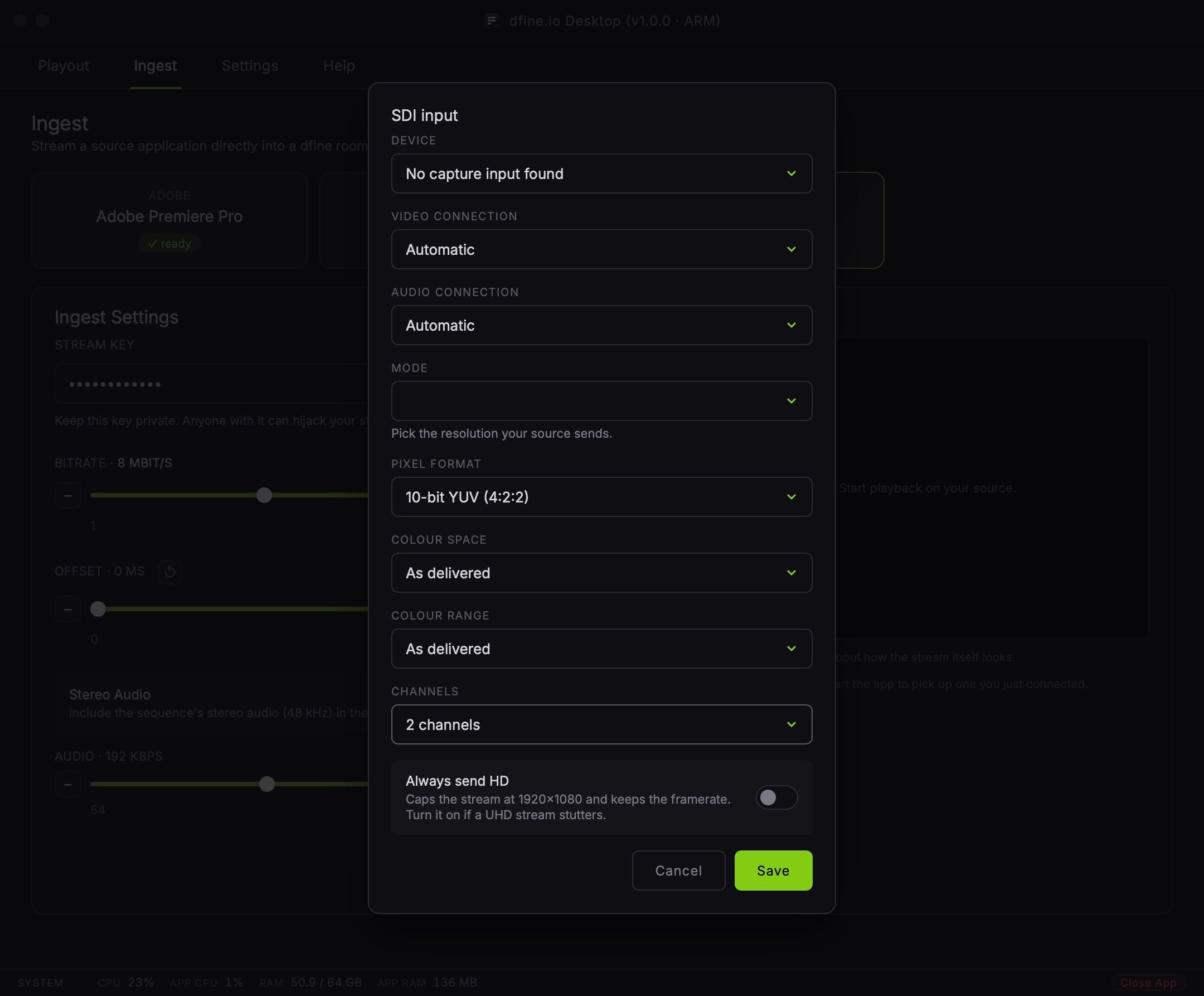 **Device** lists the capture cards the app found at launch. If yours is missing, plug it in and restart the app: it only looks once, at startup.
**Video Connection** and **Audio Connection** default to **Automatic**, which works for almost every card and cable.
## Mode is not automatic, on purpose
Every other setting has a sensible default. Mode does not, and the dialog will not let you save without one.
The card itself recognises the incoming format for its own preview, a second or so after a signal appears. That detection never reaches the encoder: the encoder starts on whatever mode you picked, and a card left on autodetect would send at a default resolution while you watch a correct-looking preview. Pick the mode your source actually sends. If you are unsure, the empty preview names what is currently arriving on the card, in the alarm colour, until you choose.
## Pixel format and colour
**Pixel Format** covers what the card can deliver, six options from 8-bit YUV up to 10-bit RGB. Pick 10-bit RGB if your source is a Resolve grade going out at 4:4:4.
**Colour Space** and **Colour Range** default to **As delivered**, which trusts the tag the card sends. Override them only when you know the card is mistagging the signal, for example a deck that always reports full range regardless of what it actually sends.
## Always send HD
Caps the encoded stream at 1920×1080 while the card keeps reading in the mode you picked. Switch it on if a UHD stream stutters on the receiving end.
This is a ceiling, not a resize. A smaller mode passes through untouched, and shape is preserved: a portrait 1080×1920 source leaves as 608×1080, not squeezed into a landscape frame.
## Check that it arrives
Once a mode is picked and saved, the preview switches from the alarm colour to your picture as soon as playback starts on the source feeding the card.
**Device** lists the capture cards the app found at launch. If yours is missing, plug it in and restart the app: it only looks once, at startup.
**Video Connection** and **Audio Connection** default to **Automatic**, which works for almost every card and cable.
## Mode is not automatic, on purpose
Every other setting has a sensible default. Mode does not, and the dialog will not let you save without one.
The card itself recognises the incoming format for its own preview, a second or so after a signal appears. That detection never reaches the encoder: the encoder starts on whatever mode you picked, and a card left on autodetect would send at a default resolution while you watch a correct-looking preview. Pick the mode your source actually sends. If you are unsure, the empty preview names what is currently arriving on the card, in the alarm colour, until you choose.
## Pixel format and colour
**Pixel Format** covers what the card can deliver, six options from 8-bit YUV up to 10-bit RGB. Pick 10-bit RGB if your source is a Resolve grade going out at 4:4:4.
**Colour Space** and **Colour Range** default to **As delivered**, which trusts the tag the card sends. Override them only when you know the card is mistagging the signal, for example a deck that always reports full range regardless of what it actually sends.
## Always send HD
Caps the encoded stream at 1920×1080 while the card keeps reading in the mode you picked. Switch it on if a UHD stream stutters on the receiving end.
This is a ceiling, not a resize. A smaller mode passes through untouched, and shape is preserved: a portrait 1080×1920 source leaves as 608×1080, not squeezed into a landscape frame.
## Check that it arrives
Once a mode is picked and saved, the preview switches from the alarm colour to your picture as soon as playback starts on the source feeding the card.
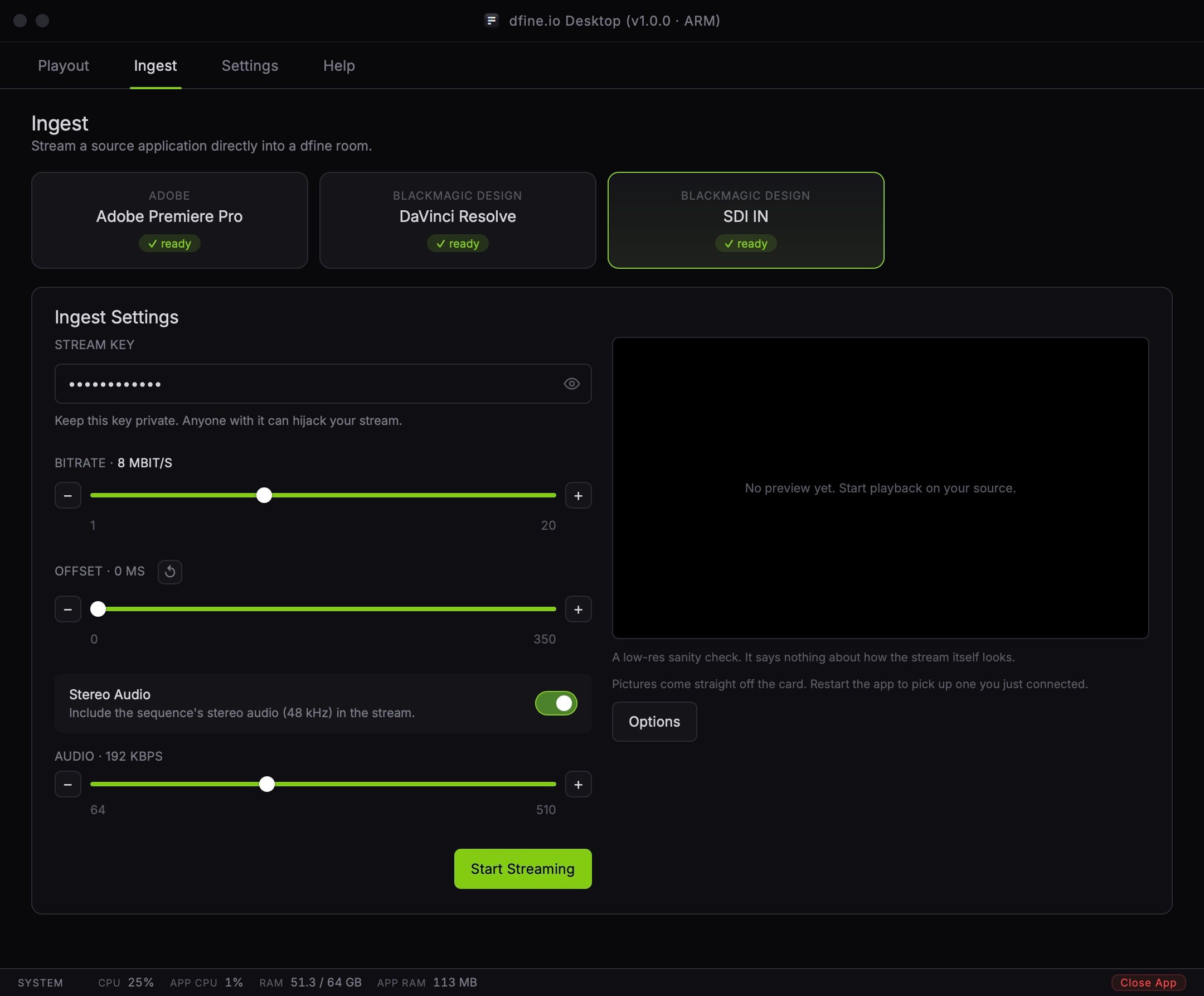 The preview is a low-resolution sanity check. It says nothing about how the stream itself looks.
## When nothing arrives
**No capture input found.** The app only looks for cards at startup. Plug the card in, then restart the app.
**Another application holds the card.** A card already open in Resolve, OBS or another capture tool will not hand pictures to a second reader. Close the other application.
**No mode was picked.** The capture refuses to start without one. Open **Options** and choose the format your source actually sends.
**The picture is there but looks wrong.** Check Colour Space and Colour Range against what your source actually outputs, rather than trusting "As delivered" for a device known to mistag its signal.
The preview is a low-resolution sanity check. It says nothing about how the stream itself looks.
## When nothing arrives
**No capture input found.** The app only looks for cards at startup. Plug the card in, then restart the app.
**Another application holds the card.** A card already open in Resolve, OBS or another capture tool will not hand pictures to a second reader. Close the other application.
**No mode was picked.** The capture refuses to start without one. Open **Options** and choose the format your source actually sends.
**The picture is there but looks wrong.** Check Colour Space and Colour Range against what your source actually outputs, rather than trusting "As delivered" for a device known to mistag its signal.