> ## Documentation Index
> Fetch the complete documentation index at: https://docs.dfine.app/llms.txt
> Use this file to discover all available pages before exploring further.
# dfine.io Studio
> Stream your edit, an SDI or HDMI feed, a media file or your screen to dfine.io, and play dfine.io out to a DeckLink card, from one Mac app.
dfine.io Studio sends a picture to dfine.io and brings one back. It streams into a Review room over WHIP or to Streaming Classic over RTMPS, and it plays a Review session or a Streaming Classic stream out to a Blackmagic DeckLink card for your reference monitor.
One app for Apple Silicon and Intel, macOS 13 or newer.
 ## How it is laid out
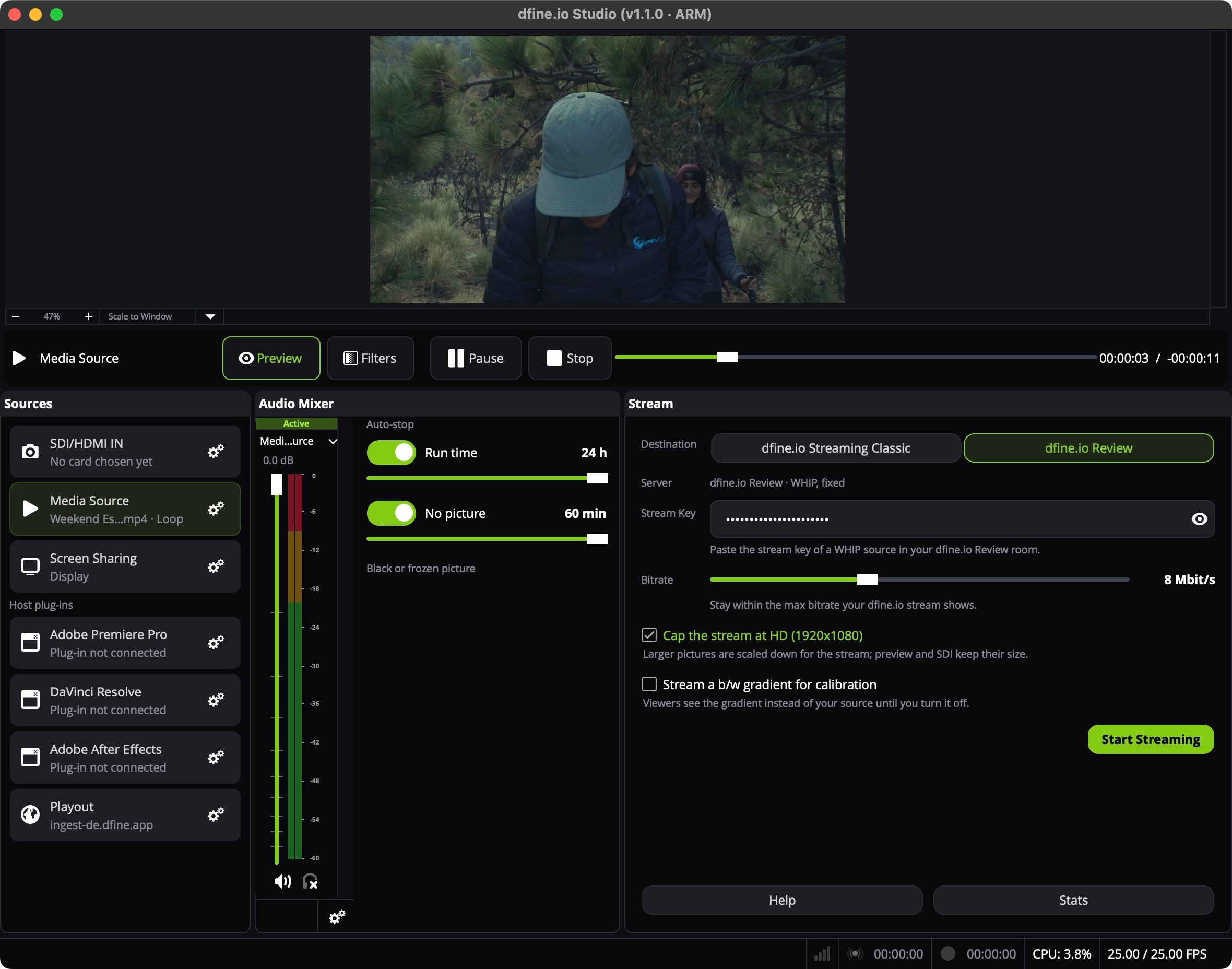
The preview at the top shows what goes out. Below it sit three panels:
* **Sources** lists seven fixed sources. Click a row to put that source on air. The gear on a row opens its setup.
* **Audio Mixer** shows the levels, with **Auto-stop** beside it.
* **Stream** holds the destination, the stream key and **Start Streaming**. While the **Playout** row is on air, this panel turns into **Playout**.
**Help** and **Stats** sit under the Stream panel.
## The sources
| Source | What it sends | Workflow |
| - | - | - |
| **SDI/HDMI IN** | The feed of a Blackmagic capture card | [Stream an SDI or HDMI feed](/en/workflows/sdi-hdmi) |
| **Media Source** | A video file, looped if you like | [Play out a finished file](/en/workflows/media-file) |
| **Screen Sharing** | A display, a window or an app | [Share your screen or one app](/en/workflows/screen-sharing) |
| **Adobe Premiere Pro** | The sequence through a plug-in | [Stream from Premiere Pro](/en/workflows/premiere-pro) |
| **Adobe After Effects** | The preview through a plug-in | [Stream from After Effects](/en/workflows/after-effects) |
| **DaVinci Resolve** | The timeline through a plug-in | [Stream from DaVinci Resolve](/en/workflows/davinci-resolve) |
| **Playout** | A Review session or a Streaming Classic stream, out to a DeckLink card | [Show a session on your reference monitor](/en/workflows/reference-monitor) |
A row that cannot run on this Mac reads **Not available on this Mac**, for example SDI/HDMI IN without the Blackmagic Desktop Video driver.
## One direction at a time
Studio either streams or plays out. A running stream locks the **Playout** row with **Stop the stream to switch to Playout.**, and a running SDI output locks the other sources. Bitrate, HD cap and auto-stop: [Stream settings](/en/apps/studio/stream-settings).
## Permissions
macOS asks for **Screen & System Audio Recording** the first time you share your screen or send DaVinci Resolve's sound. Installing or removing the Resolve plug-in asks for your administrator password. Studio uses no camera and no microphone.
This documentation is built and hosted on [Mintlify](https://mintlify.com), a developer documentation platform.
## How it is laid out
The preview at the top shows what goes out. Below it sit three panels:
* **Sources** lists seven fixed sources. Click a row to put that source on air. The gear on a row opens its setup.
* **Audio Mixer** shows the levels, with **Auto-stop** beside it.
* **Stream** holds the destination, the stream key and **Start Streaming**. While the **Playout** row is on air, this panel turns into **Playout**.
**Help** and **Stats** sit under the Stream panel.
## The sources
| Source | What it sends | Workflow |
| - | - | - |
| **SDI/HDMI IN** | The feed of a Blackmagic capture card | [Stream an SDI or HDMI feed](/en/workflows/sdi-hdmi) |
| **Media Source** | A video file, looped if you like | [Play out a finished file](/en/workflows/media-file) |
| **Screen Sharing** | A display, a window or an app | [Share your screen or one app](/en/workflows/screen-sharing) |
| **Adobe Premiere Pro** | The sequence through a plug-in | [Stream from Premiere Pro](/en/workflows/premiere-pro) |
| **Adobe After Effects** | The preview through a plug-in | [Stream from After Effects](/en/workflows/after-effects) |
| **DaVinci Resolve** | The timeline through a plug-in | [Stream from DaVinci Resolve](/en/workflows/davinci-resolve) |
| **Playout** | A Review session or a Streaming Classic stream, out to a DeckLink card | [Show a session on your reference monitor](/en/workflows/reference-monitor) |
A row that cannot run on this Mac reads **Not available on this Mac**, for example SDI/HDMI IN without the Blackmagic Desktop Video driver.
## One direction at a time
Studio either streams or plays out. A running stream locks the **Playout** row with **Stop the stream to switch to Playout.**, and a running SDI output locks the other sources. Bitrate, HD cap and auto-stop: [Stream settings](/en/apps/studio/stream-settings).
## Permissions
macOS asks for **Screen & System Audio Recording** the first time you share your screen or send DaVinci Resolve's sound. Installing or removing the Resolve plug-in asks for your administrator password. Studio uses no camera and no microphone.
This documentation is built and hosted on [Mintlify](https://mintlify.com), a developer documentation platform.